
The app and website do different things. Your profile, conversations and account controls are in the Android app. The website explains how to use them. Selecting a screenshot only opens a larger image.
Delete your account in the Android app
Open BeAnon on the phone where you can access your account. The route is Profile → Account settings → Delete account.
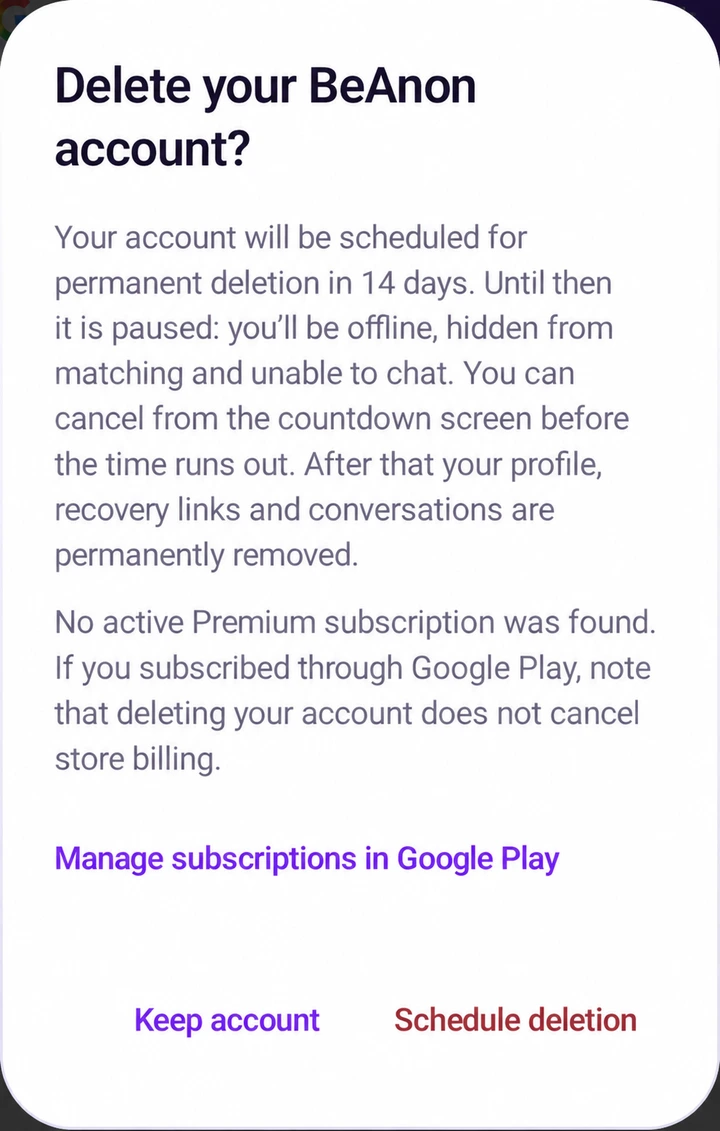
The account-deletion pending period is 14 days. The screens use a test profile; the confirmation image has been edited to show the 14-day period. Screen details can vary by version. Always check the notice and deadline in your own app.
Step 1
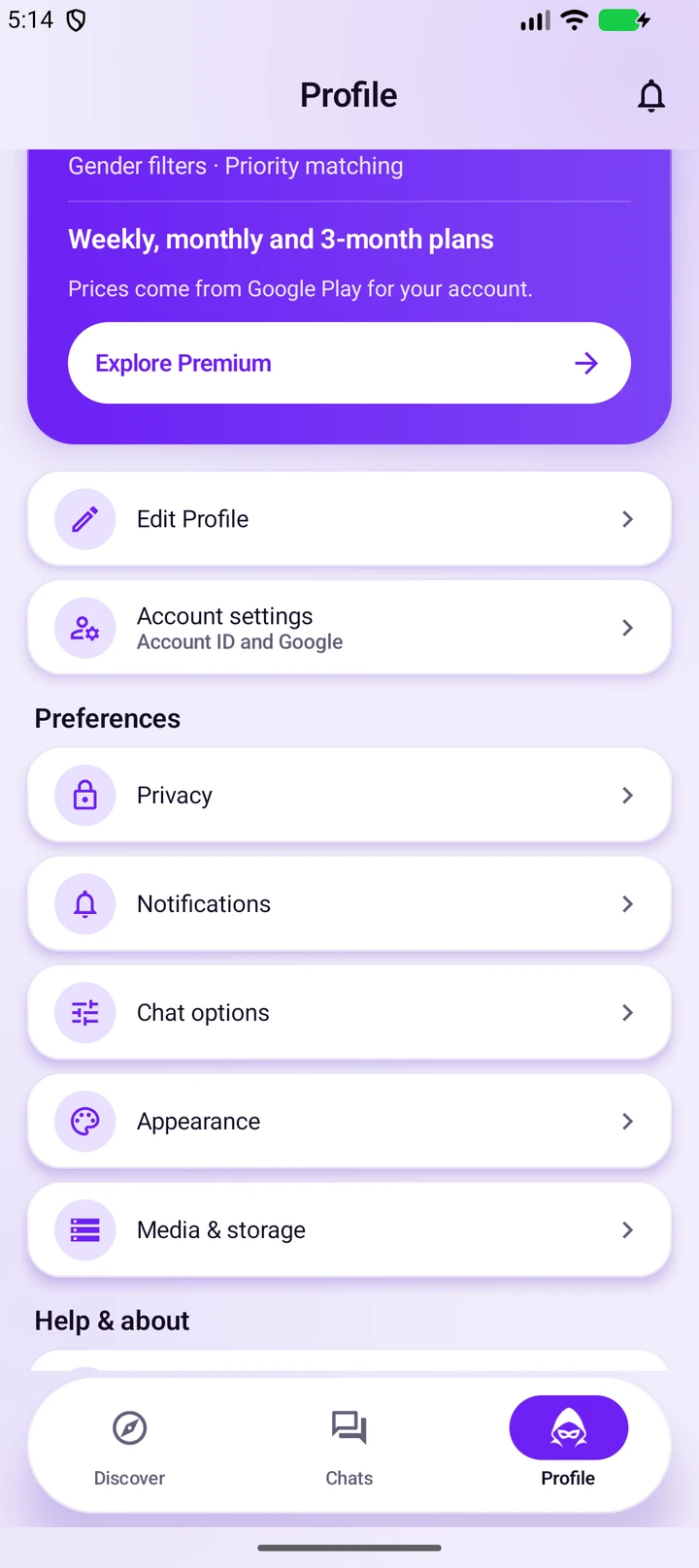
Open Profile and find Account settings
Tap Profile in the bottom navigation. Scroll down past your profile and Premium section, then tap Account settings.
Use the account you intend to delete. Browsing this website does not select an app account.
Step 2
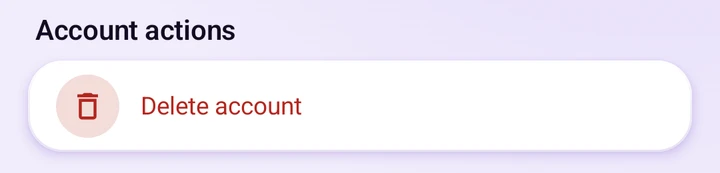
Choose Delete account
In Account settings, find Account actions and tap Delete account. This opens a review dialog; it does not yet schedule deletion.
The screenshot shows just the relevant part of the real screen, leaving out the test account identifier.
Step 3
Read the notice before confirming
Check the waiting period, what will happen to your account and any subscription information. If you want to proceed, select Schedule deletion inside the app.
Changed your mind before submitting? Select Keep account to close this dialog.
14-day pending period: the illustration shows the deletion notice with 14 days. Selecting Schedule deletion in the app submits the request; viewing this guide does not.
The 14-day pending period
After the app confirms your request, your account enters a 14-day pending-deletion period. Use the deadline shown in the app to check how much time remains.
- Check the app’s status. Wait for the request result and read the deadline shown on the pending-deletion screen. If the app is still confirming the request or displays an error, do not assume deletion was scheduled.
- Normal use pauses while deletion is pending. The app’s pending state stops matching and chatting.
- To keep your account after scheduling, use the cancellation option on the pending-deletion screen before the displayed deadline and check that the app confirms cancellation. Opening the app, signing in or contacting support does not cancel it automatically.
- After the deadline, deletion is scheduled to proceed. Completion may take longer; do not rely on being able to cancel or recover the account afterwards.
The pending-state and cancellation instructions describe the app’s implemented flow. They were not exercised for these screenshots. Completion across the service, providers and backups still needs release verification.
If you cannot access your account
A Google account linked earlier may help you restore access on another phone. Recovery availability depends on your account and app version; it is not guaranteed. Do not create a different account expecting it to give you access to the old one.
Get account-access help if you are stuck. This contact is for guidance; this website does not provide an account-deletion request form or a way to manage your app account. Never send passwords, one-time codes or recovery credentials.
Only want to uninstall the Android app?
Uninstalling removes the app from your phone. It does not request deletion of your BeAnon account or server-stored history.
- Open Android Settings → Apps and select BeAnon (you may need to choose “See all apps”).
- Choose Uninstall and confirm. Labels differ between Android phones.
If you want to delete your account as well, complete the in-app deletion steps and check the request status before removing the app. If you may want to cancel pending deletion, keep access to the app until you have made that decision.
Cancel a Google Play subscription separately
Deleting your account or uninstalling BeAnon does not automatically cancel store billing. If you subscribed through Google Play, open Google Play → profile icon → Payments & subscriptions → Subscriptions, select the BeAnon subscription and follow the cancellation steps. Use the Google account that made the purchase.
The deletion dialog may also provide Manage subscriptions in Google Play. Review Google Play’s confirmation and any remaining access period. If you do not have a subscription, there is no subscription to cancel. Google Play’s subscription instructions.
Account data and deletion limits
Account deletion is intended to remove your profile, recovery links, preferences, connections and associated conversations/media, subject to the limited retention described in the Privacy Policy. Do not treat this screenshot guide as proof that every provider copy or backup has already been removed.
Ending one chat, removing a conversation from your list and deleting your account are different actions. Copies that another person saved outside BeAnon are outside our control.
Retained records and backups
Limited records may need to remain for legal preservation, security, safety investigations or accounting. These reasons do not mean every conversation must be retained. Backup expiry and provider cleanup are separate from the account’s pending-deletion timer.
The final retention schedule and end-to-end cleanup still require verification before release. Read the Privacy Policy’s retention section for current disclosures; we cannot promise that all copies disappear at the instant a timer ends.
Unresolved privacy or safety concerns
Use grievance@beanon.app for formal privacy concerns or an unresolved complaint. See the grievance and appeal procedure. For immediate danger, contact the appropriate emergency services.
More about the app
Explore the illustrated Android app guide, get support, or read the Terms and Privacy Policy.